
The workbench
The workbench puts a copilot conversation beside a harness workspace. Ask the copilot to build, run, diagnose, or improve a harness, then inspect the actual spec, run journal, measurements, and proposals yourself. Target runs belong to the target harness; the copilot's own reasoning is recorded separately.
Workbench 0.2.0, developed alongside hiveloom 1.3.0, adds research programs,
provider setup, harness settings, and explicit fork resume. It requires runtime
1.3.0. The npm package ships separately: at this documentation release npm
still offers 0.1.0. Use the v1.3.0 source tag for the features described here;
Install gives the setup commands.
Open it and configure a provider
# From the v1.3.0 checkout, after uv sync --extra dev:
devtools/ui/dev.sh
# http://127.0.0.1:5173
The packaged launcher (npx hiveloom-workbench or hiveloom ui) will offer
these features when workbench 0.2.0 is published, at port 8770. It finds an interpreter
with hiveloom, or provisions an environment, starts the Python API on a private
loopback port, and serves the interface and API proxy at one browser origin.
--port moves that port; --dir adds a harness and --scan-dir discovers a
harness tree. Contributors use devtools/ui/dev.sh at port 5173.
Open Settings → Models, add a provider, and choose the models you want available. Anthropic, OpenAI, Mistral, and OpenRouter have dedicated entries; Other registers an OpenAI-compatible endpoint. Catalog providers offer registered models, while aggregators and custom endpoints take model IDs. Shared searchable pickers use those configured choices. Legacy and restricted metadata removes models from default offers without invalidating existing IDs.
Keys entered here are saved locally in $HIVELOOM_HOME/.env (default
~/.hiveloom/.env) with owner-only permissions. The interface reports key
presence and source, not the stored value. Environment credentials take
precedence; deleting a saved provider cannot remove a key exported by the
parent process. Custom endpoints are written to providers.yaml and the
registry reloads; hand-maintained models.yaml loads afterwards and wins.
Workbench choices and its default live in workbench/providers.json.
A separate CLI process reads provider declarations but does not automatically
adopt the workbench's .env: export its key or use the harness's own .env
when invoking the CLI. See Models and providers.
Separate workbench settings from harness settings
| Setting | Scope |
|---|---|
| Global Settings → Models | Providers available here, selectable models, and fallback default |
| Copilot model picker | Model for the current copilot interaction |
| Harness workspace → Settings | The harness's persisted run model, temperature, input-token budget, and durable memory |
| Improve or Research model choice | Proposing model or program director, separate from the executor |
| Global Settings → Memory | Copilot memories shared across conversations, including scoped preferences |
Harness Settings writes through the validated construction API. It changes the harness's future configuration; recorded runs retain their actual model. Evolution cannot change the frozen executor model, even though an operator can set it explicitly here.
If a target run's provider cannot be constructed because its key is missing, the workbench uses its configured default model for that run when available. It shows the expected and used models; the harness spec stays unchanged. A keyless local or scripted provider remains usable as configured, and adding missing credentials restores the configured model on subsequent runs. Check the effective model when comparing outcomes. This fallback is a workbench convenience, not CLI behavior or a response to a failing API call.
Navigate the harness workspace
| Tab | Use it to |
|---|---|
| Use | Execute a generated harness interface |
| Overview | Read the task, model, tools, guardrails, and acceptance checks |
| Runs | Compare recorded outcomes, cost, and turns |
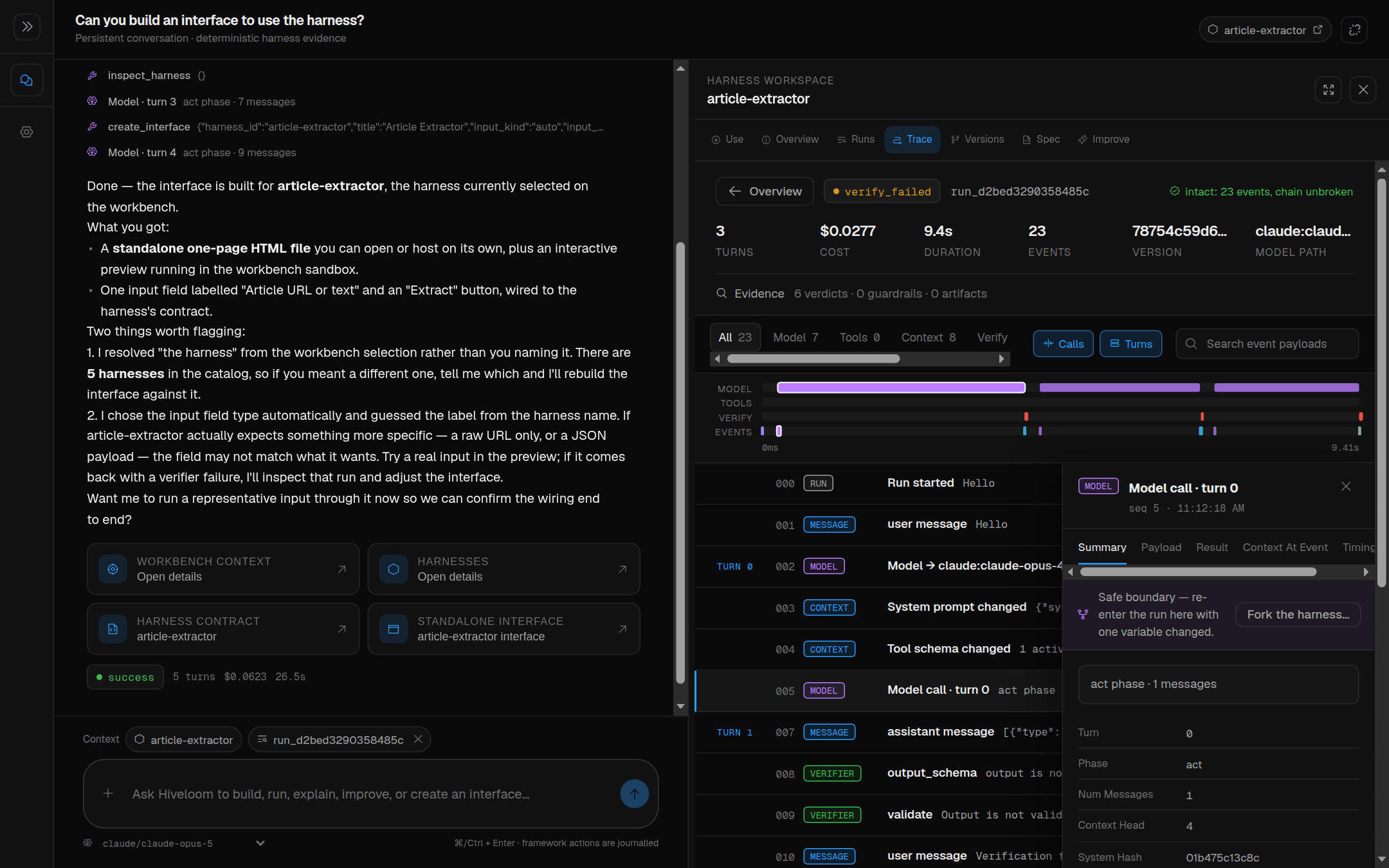
| Trace | Inspect events, integrity, payloads, folded context, timing, and lineage |
| Versions | Read the version graph, tags, and comparisons |
| Spec | Edit validated spec fields through the construction API |
| Improve | Review evolution proposals or open autonomous evolution |
| Research | Configure and follow a research program |
| Settings | Set this harness's run model and durable memory |
Selecting a harness or run attaches it as copilot context and opens the workspace. Resize the conversation/workspace divider to give evidence more room. Conversation messages, artifacts, and selection persist across refresh and server restart in a local SQLite database.
Installed state lives at ~/.hiveloom/workbench/; HIVELOOM_HOME relocates
it. A source checkout keeps conversations in devtools/ui/.hiveloom/.
HIVELOOM_UI_DB overrides the conversation database path. Provider declarations
and keys remain under HIVELOOM_HOME, including when running from source.
Copilot memory is distinct from executor memory.entries: the copilot's
recall_memories, remember_memory, and forget_memory tools manage the
former, while the harness's durable lessons travel with its spec.
Read a run and steer it
Trace displays ordered journal events, their payloads, the hash-chain result, timing, and the folded context at a selected model call. Context reconstruction shows the journaled request; redacted values remain redacted. Export returns the original journal bytes so the hash chain remains verifiable.
While a run is active, you can stop it, queue steering messages, edit or delete
queued messages, switch playbooks, or change models. The framework applies
these controls at a turn boundary through RunControl; playbook transitions
keep their own entry/exit gates. A stop does not promise immediate cancellation
of an in-flight provider request.
Delegated runs link to their parent and children with outcome and cost. Referrals show peers that fitted but did not qualify. Use lineage to compare a handoff or fork without treating it as an unrelated run.
Fork, change, and resume
Pick a model call in Trace, name a fork, and optionally choose a model. The fork restores the spec, behavioral files, conversation prefix, and authorized run memory for that point. It appears beneath its containing harness.
Use Resume from turn in the fork workspace or fork rail to continue that conversation. The control shows new model calls, outcome, cost, and failed validator feedback. Running from Use starts a fresh task instead; it does not resume the saved prefix.
Versions compares recorded versions and changed failure signatures. Construction events now include old/new version hashes, which let the graph attribute validated spec edits. Research candidates remain in Research rather than appearing in the Versions graph.
Supporting files such as rate tables come from the current source folder; they are not verified as historical data. Read Journal and forks for drift, exclusions, redaction, and trust limitations.
Run autonomous improvement
Open Research, or choose Evolve autonomously in Improve. Provide an existing eval or a concepts charter, select the director, review the allowed levers, classify effectful tools, and set budget and stopping rules.
Research shows:
- the unit and round in progress, with completed/total eval cells;
- experiment verdicts and per-case base/candidate links that open in Trace;
- exploration, experiment, data, and reserved confirmation spending;
- hypotheses, findings, trust, confirmation, the report, and ledger;
- contract approval and label-question cards in concepts mode;
- the resulting proposal, handed to Improve for review.
A rail badge identifies programs needing your attention. The copilot can start, follow, and relay a program, including its contracts and questions. Programs run in background jobs, and jobs interrupted by a server restart resume from their saved state. A stop lets the current unit finish before confirmation and reporting. Read Research programs for verdicts and execution boundaries; concepts mode requires approval and may require human labels.
Review changes and create an interface
Improve exposes the proposal queue. Pending text changes show a diff against the current spec; applied proposals show their recorded YAML diff and old/new version hashes. Applying a proposal is an explicit action; YAML changes go through the evolution gate, and code changes require separate approval. Frozen fields remain protected. Drafting and measurement can incur model cost before that application decision.
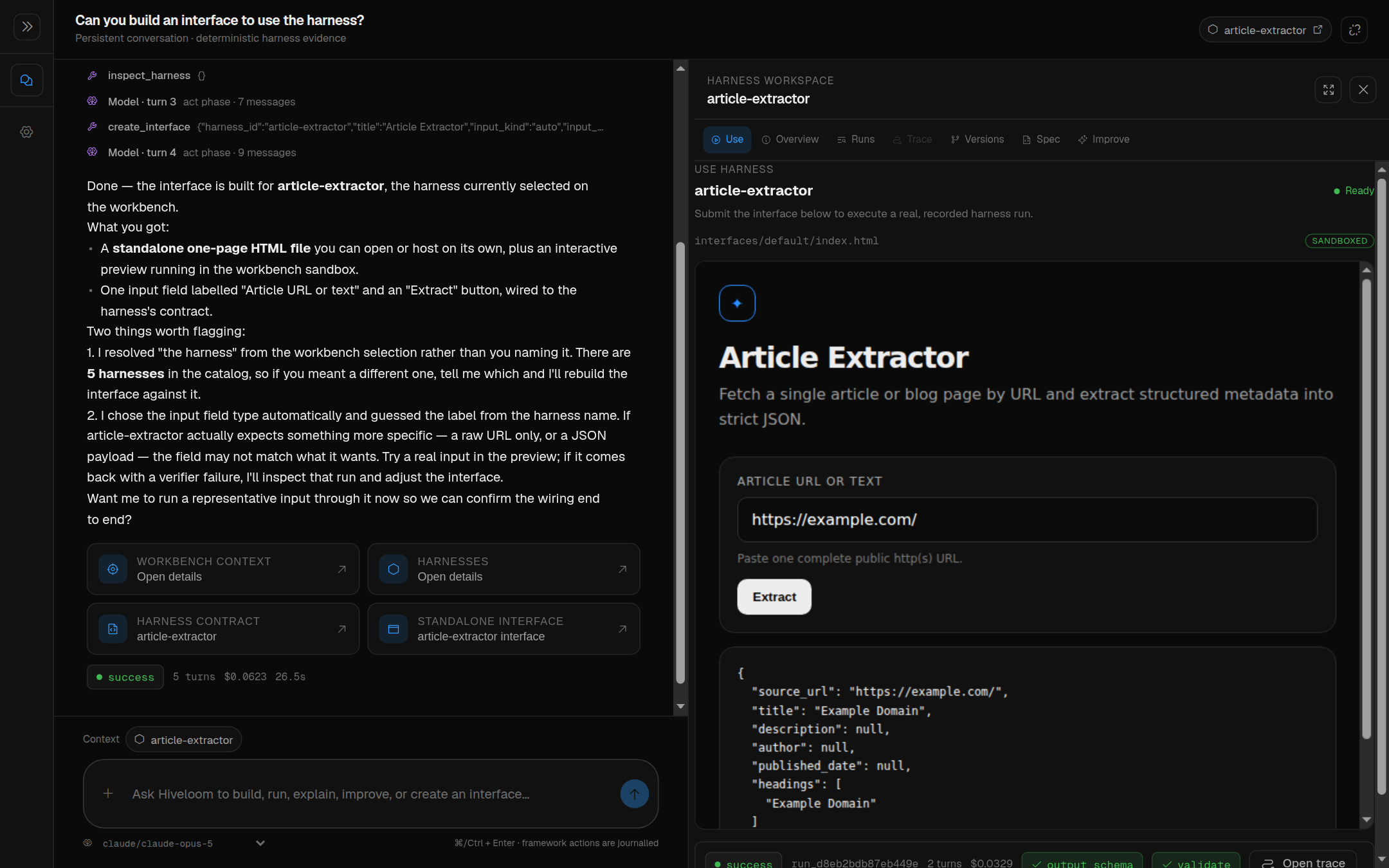
The copilot's create_interface tool writes a dependency-free HTML page at
<harness>/interfaces/default/index.html. Use previews it in an
allow-scripts iframe sandbox with a narrow message bridge that can execute
only its named harness. Literal text/URL input and contained file uploads use
the normal runner, with progress, status, verification, and cost visible.
An interface can also call a deployment's /run endpoint. File inputs outside
the workbench need an upload bridge supplied by that deployment. The iframe
receives neither credentials nor direct framework objects.
Foreign target code keeps the normal trust gate; builtin names come from the
live catalog. File uploads use contained paths and cannot enter private state
such as .hiveloom or .env. Python hooks still execute as trusted code in
the runtime process; the browser sandbox does not isolate those hooks.
Explore populated examples from source
The checkout's live examples start without history. An optional showcase copies all three, runs them on a real model, and seeds runs, a fork, measured evolution, and a research program:
devtools/ui/dev.sh --showcase
Seeding uses OPENROUTER_API_KEY and makes paid model calls; it is not an
offline demo. Its harness copies, Hive, registry, and trust state live under
devtools/ui/.hiveloom/showcase/, separate from ordinary runs. Subsequent
launches reuse the seeded history. The script
uv run python devtools/ui/showcase.py --reset discards and rebuilds that
showcase while retaining its provider setup; use it only when you want fresh
seeded history.